
You can not select more than 25 topics
Topics must start with a letter or number, can include dashes ('-') and can be up to 35 characters long.
 The Dod
14b41eef7f
New README screenshots
The Dod
14b41eef7f
New README screenshots
|
1 rok temu | |
|---|---|---|
| HuzzahAPDistance | 1 rok temu | |
| static | 1 rok temu | |
| templates | 1 rok temu | |
| .gitignore | 1 rok temu | |
| README.md | 1 rok temu | |
| app.py | 1 rok temu | |
| requirements.txt | 1 rok temu | |
| run.sh | 1 rok temu |
README.md
README.md
Eye of Beholder
A work about false narratives, dead journalists, and not-so-innocent bystanders.
דברים שרואים משם

לא רואים מכאן

Install distance sensor server (on Adafruit Feather HUZZAH ESP8266 board)
$ cd HuzzahAPDistance
$ cp config.h.example config.h # and edit it with SSID and Password for the AP (pick something hard to guess)
Upload to the Huzzah board, and connect it to HC-SR04 like this:
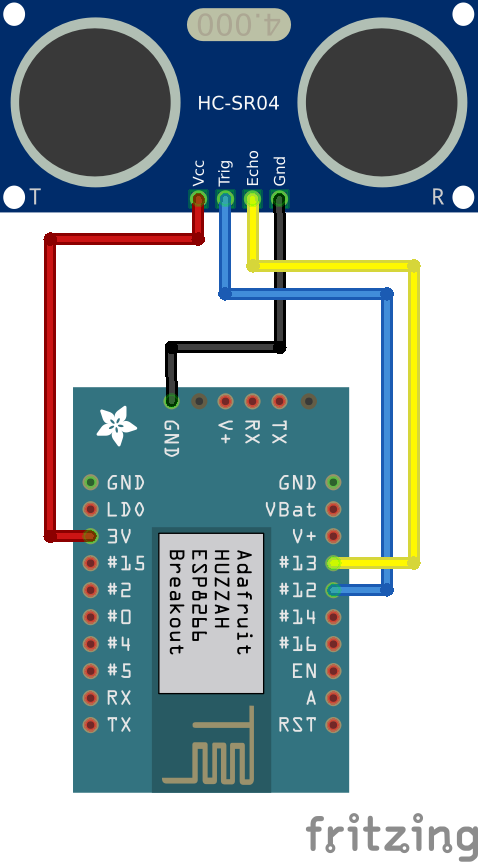
Test distance sensor server
Connect PC to the WiFi network you’ve defined at config.h
Browse to http://192.168.115.23. You should see a report of list of current client MAC addresses (typically, only yours), and a link to a JSON end point that returns distance.
Install web server (on linux PC)
$ virtualenv venv
$ . venv/bin/activate
$ pip install -r requirements.txt
$ cd ../static/js
$ cp config.js.example config.js # and edit it according to room size, etc.
Run web server
$ ./run.sh
Browse to http://localhost:5000 to see the work.
Browse to http://localhost:5000/p to see distance as a progress bar (this can help callibrate static/js/config.js)